Google Sheets budget template: a practical monthly system
Plan income, set category limits, track actual spending and see what remains without turning budgeting into a second job.
 Written by JosephinePublished July 25, 2026Last updated July 27, 202610 min
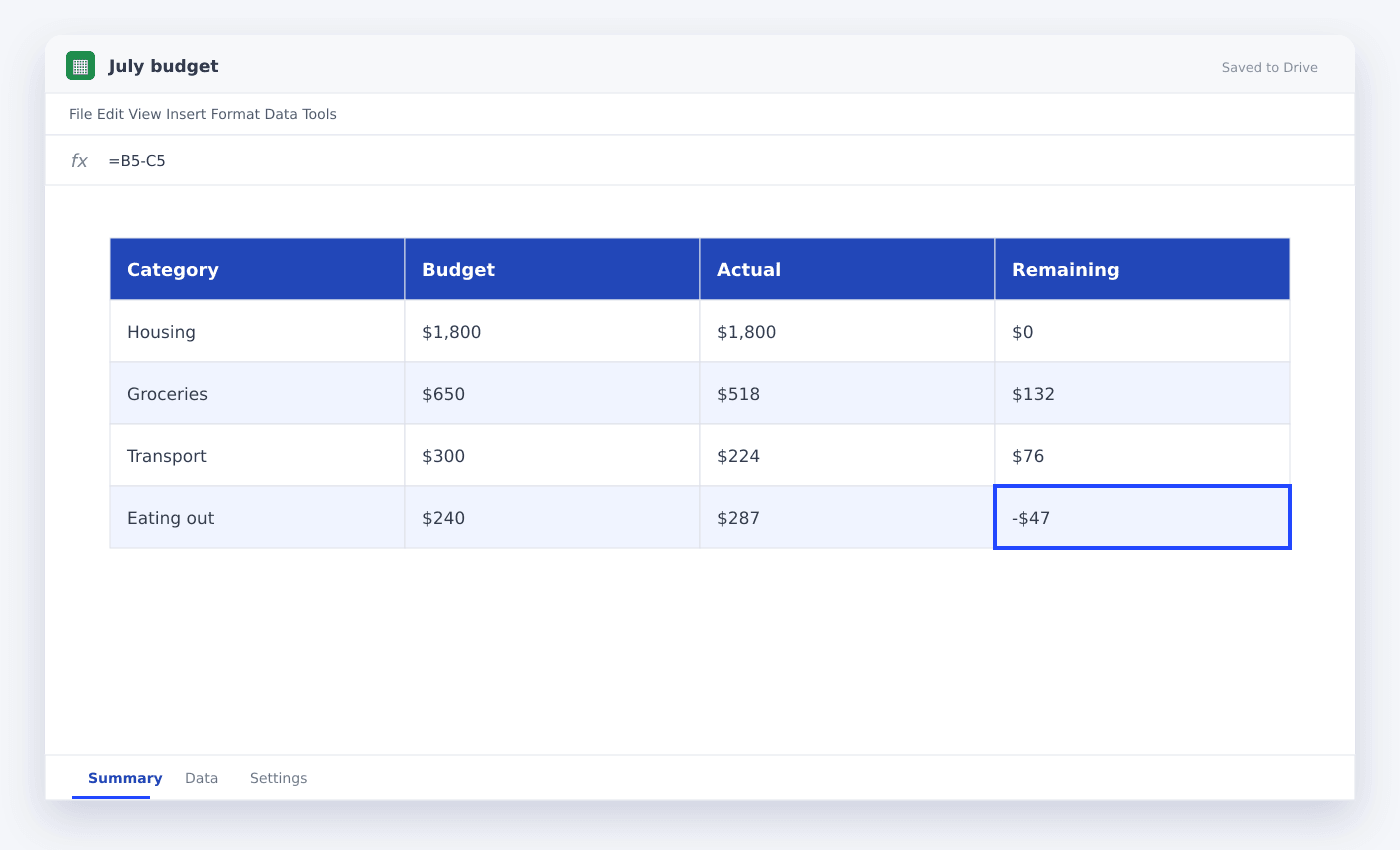
Use one transaction log, one category list and one monthly summary. SUMIFS can total actual spending by category and month, while a simple variance formula shows the amount left in each budget.
Most budgets become difficult because they copy the same layout across twelve tabs. A single transaction table is easier to maintain and gives formulas one dependable source.
Start with a small list of categories you will actually use. The purpose is not perfect classification; it is seeing where the month is headed early enough to adjust.
Google Sheets budget template: a practical monthly system
- 01List monthly income
Separate expected and received income so a late payment does not look like spendable cash.
- 02Choose useful categories
Use a short category list with consistent names and apply it through a dropdown.
- 03Create the transaction log
Record date, description, category, account and amount in one continuous table.
- 04Set category budgets
Enter a monthly limit beside each category on the summary tab.
- 05Calculate actual spending
Use SUMIFS to total the transaction amount for the chosen category and month.
- 06Review remaining cash
Compare income received with total spending and planned obligations before the month ends.
Use three tabs, not twelve
A clean budget needs Transactions, Monthly Summary and Settings. Transactions holds every line. Settings holds categories and accounts. The summary pulls the selected month from the same data.
This layout also makes annual reporting easier because every date and amount lives in one consistent table.
Calculate actuals by month and category
Use SUMIFS with a category criterion and two date boundaries. Refer to the category label and month-start cell rather than typing those entries into each formula.
When you add a new transaction, the summary updates without copying it into another tab.
=SUMIFS(Transactions!$E$2:$E$1000,Transactions!$C$2:$C$1000,$A6,Transactions!$A$2:$A$1000,">="&B$2,Transactions!$A$2:$A$1000,"<"&EDATE(B$2,1))Make the weekly review short
Once a week, classify new transactions, scan the largest variances and check upcoming fixed costs. That is enough to keep the model useful.
A budget that takes five minutes every week will outperform an elaborate model that you stop opening.
Questions people ask
Should expenses be positive or negative?+
Either works if you are consistent. For a personal budget, positive expense amounts are usually easier to read and sum by category.
How do I handle credit-card payments?+
Record the original purchases as expenses. Treat the card payment as a transfer so spending is not counted twice.
Can couples share one budget sheet?+
Yes. Add an Account or Person column to the same transaction log, then filter or summarize by that field.
More from SheetSteps

Google Sheets invoice template: build one that tracks payment
9 min · Templates

How to use SUMIF in Google Sheets
8 min · Formulas

How to build a Google Sheets dashboard people can read
11 min · Data & charts